ADVERTISEMENT
  • About Us
  • Advertise
  • Contact Us
  • Privacy Policy
Saturday, November 7, 2026
NewsOnline Nigeria
  • Headlines
  • Top Stories
  • Politics
  • Crime Watch
  • Entertainment
  • Sports
No Result
View All Result
  • Headlines
  • Top Stories
  • Politics
  • Crime Watch
  • Entertainment
  • Sports
No Result
View All Result
NewsOnline Nigeria
No Result
View All Result
  • Headlines
  • Top Stories
  • Politics
  • Crime Watch
  • Entertainment
  • Sports
ADVERTISEMENT
Home Featured

NIN-SIM Linkage: How To Link 7 SIM Cards to NIN on NIMC APP

by NewsOnline Nigeria
February 10, 2023
in Featured, Headline
0
NIMC APP

NIMC APP

NIN-SIM Linkage, see how to link 7 SIM Cards to NIN on NIMC APP below.


Newsonline had reported earlier that the Federal Government of Nigeria directed telecommunication companies to bar all outgoing calls on unlinked lines from Monday, April 4, 2022.


This online news platform understands that unlinked lines are sims not yet registered and linked with the National Identification Number (NIN).


Newsonline Nigeria reports that Ikechukwu Adinde, the director of public affairs, NCC, and Kayode Adegoke, the head of corporate communications, NIMC, disclosed this in a joint statement on Monday, April 4, 2022.


“President Muhammadu Buhari has approved the implementation of the Policy with effect from the 4th of April, 2022. Consequently, the Federal Government has directed all Telcos to strictly enforce the Policy on all SIMs issued (existing and new) in Nigeria. Outgoing calls will subsequently be barred for telephone lines that have not complied with the NIN-SIM linkage Policy from the 4th of April, 2022. Subscribers of such lines are hereby advised to link their SIMs to their NINs before the Telcos can lift the restriction on their lines. Affected individuals are hereby advised to register for their NINs at designated centers and thereafter link the NINs to their SIMs through the channels provided by NIMC and the Telcos, including the NIMC mobile App,” the statement read in part.

As directed by the Federal Government unlinked lines were barred. Apparently displeased with the development, several subscribers took to social media on Tuesday, April 5, 2022, to express their displeasure over the barring of their communication lines by telecommunication network providers in Nigeria.

If you haven’t done so and your line is still active, you have the privilege to link seven active SIM to your National Identity Number (NIN).


Seven SIM Cards Can Be Linked To One NIN – Pantami


The Minister of Communications and Digital Economy, Dr Isa Pantami, disclosed that you can link up to seven SIM Cards to the same NIN also known as the National Identity Number.


His announcement was a relief to thousands of Nigerians who use multiple SIM cards for business or network reasons.


So, if you have multiple SIM cards, the Federal Government said you can link all of them to one NIN. The government isn’t against having multiple lines but stated that they must all be linked to NIN.

On Channels Television Politics Today in 2021, he said:

“We developed an app, when you go online, you will see it. That app, as long as you have your NIMC number, you will only download it without visiting any office. You will be able to link up to seven SIM numbers to only one.

Channels TV

I have already downloaded the app, launched the app, and already linked some of my numbers immediately. This is part of digitalisation,” he said.

If you have MTN, Glo, Airtel, 9Mobile, and other lines, below is the guide on how to link all of them to a NIN

Step 1: Download the original NIMC app from NIMC official portal at: nimcmobile.app/ it’s available on Google Play Store and Apple App Store

Step 2: Use your 11-digit NIN digits to login into the app

Six options on NIMC Mobiel are:

  • Show MY ID
  • Get Virtual NIN
  • Scan an ID
  • Security PIN
  • Print NIN Slip
  • Link My Numbers

Step 3: Click Link My Numbers

Link 7 SIM Cards To NIN On NIMC Mobile App infomediang
Photo credit: NIMC App

Step 4: Enter the number you want to link. The SIM must be inserted into a phone for you to receive an OTP for verification purposes

Step 5: Enter the OTP that’s sent to the phone number and hit submit.
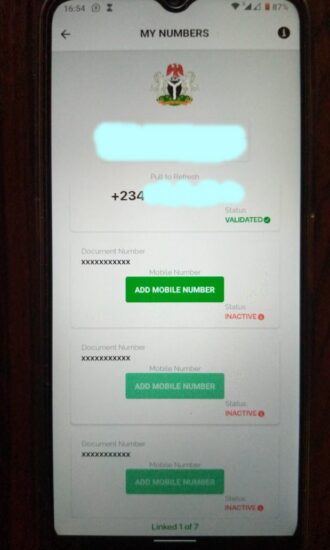
Linking multiple lines to National Identity Number
Photo credit: NIMC Mobile App

To link another SIM to your NIN, repeat the process above

NOTE:

The phone number you want to link must be active for you to receive an OTP for validation

That’s all. Allow NCC and NIMC to handle the rest. This way, you don’t have to visit any service centres of a telecom firm to link your NIN to your mobile number or bother yourself with the dialling of USSD codes.


If you prefer to do this individually, you can check our guides on: Linking MTN to NIN and Linking GLO to NIN or link your NIN to your Airtel line depending on your network.


That’s how to link multiple lines to your National Identity Number (NIN) on the National Identity Management Commission.

Previous Post

Black Market Dollar To Naira Exchange Rate Today 10th February 2023

Next Post

Latest NPower News For Today Friday, February 10 2023

Next Post
Npower News

Latest NPower News For Today Friday, February 10 2023

Trending Stories

JAMB Past Questions

Download JAMB Past Questions & Answers PDF From 1983 Till Date [All Subjects]

Elisha Abbo

2023 Elections: Court sends Elisha Abbo, Bagos, 16 others packing from NASS (FULL LIST)

ADC Judgment

“Washington Is Watching”: US Firm Warns Tinubu, Keyamo Over ADC Judgment

Nigeria Common Entrance Past Questions

Nigeria Common Entrance Past Questions & Answers | 2011 Till Date

Omoge Saida

Popular Socialite Omoge Saida’s Private Video Sparks Outrage Online (WATCH VIDEO HERE)

Zoho Campaigns

Zoho Campaigns Adds WhatsApp Marketing and AI Agent Support

NIMC APP

NIN-SIM Linkage: How To Link 7 SIM Cards to NIN on NIMC APP

Bianca Ojukwu

Moment Bianca Ojukwu Held Umahi’s Hand From Touching Her Waist (VIDEO)

Latest Stories

David Mark

BREAKING: ADC Chairmen Demand INEC Remove David Mark From Portal, Threaten Nationwide Protest

Tech Fair 2026

Zenith Bank Awards Record ₦190m to 13 Winners at Tech Fair 2026

ADC Judgment

“Washington Is Watching”: US Firm Warns Tinubu, Keyamo Over ADC Judgment

Zoho Campaigns

Zoho Campaigns Adds WhatsApp Marketing and AI Agent Support

Aig-Imoukhuede

Aig-Imoukhuede Urges African Financial Leaders to Make Capital Count for Productivity

2027 U-23 AFCON Qualifiers: CAF Names Ugandan Referee for DR Congo–Nigeria First Leg

Harry Kane Becomes Europe’s Highest-Paid Footballer After Signing New Bayern Munich Contract

‘I Can’t Risk My Life for a Relationship’ — Blessing CEO Ends Romance with IVD

2027 U-23 AFCON Qualifiers: Ortega to Take Charge of Olympic Eagles as Chelle Is Absent

Rio Ferdinand Reveals Advice He Gave Osimhen Over Potential Manchester United Move

NewsOnline 2026

NewsOnline Nigeria brings you breaking news, politics, the 2027 election, business, world news, entertainment and sports, reported accurately and on time.

RELEVANT PAGES

  • About Us
  • Advertise
  • Contact Us
  • Privacy Policy

ALERT US

Important Press Releases, Tips: newsroom@newsonlineng.com

OFFICE ADDRESS

Akin Adesola Street, Victoria Island, Lagos
+2348161846326

Copyright © 2026 NewsOnline Nigeria

No Result
View All Result
  • Headlines
  • Top Stories
  • Politics
  • Crime Watch
  • Entertainment
  • Sports

Copyright © 2023 Newsonline Nigeria