ADVERTISEMENT
  • About Us
  • Advertise
  • Contact Us
  • Privacy Policy
Friday, June 12, 2026
NewsOnline Nigeria
  • Headlines
  • Top Stories
  • Politics
  • Crime Watch
  • Entertainment
  • Sports
No Result
View All Result
  • Headlines
  • Top Stories
  • Politics
  • Crime Watch
  • Entertainment
  • Sports
No Result
View All Result
NewsOnline Nigeria
No Result
View All Result
  • Headlines
  • Top Stories
  • Politics
  • Crime Watch
  • Entertainment
  • Sports
ADVERTISEMENT
ADVERTISEMENT
Home Education

How to Create 2022 JAMB Profile & Get a 10-Digit Profile Code

by NewsOnline Nigeria
January 24, 2022
in Education, Headline
0
Latest JAMB News

Latest JAMB News

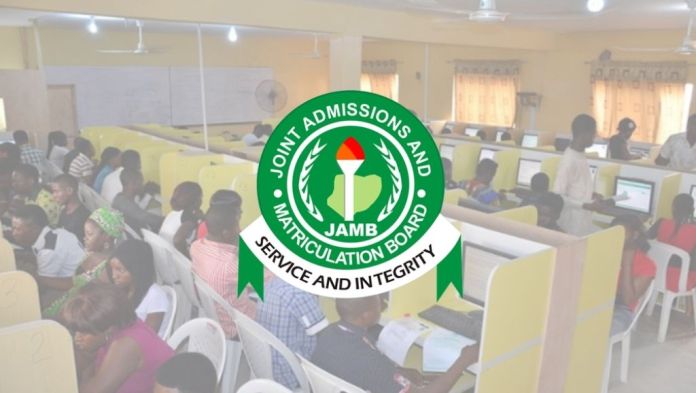
How to Create 2022 JAMB Profile & Get a 10-Digit Profile Code can be accessed below.


NewsOnline brings to you the step by Step Guidelines on Joint Admission Matriculation Board (JAMB) Profile Account Creation, Getting of JAMB Profile Code and Password Recovery Guidelines.


ALSO: JAMB 2022 List of Suspended & Delisted CBT Centers Nationwide


This is to inform all candidates who wishes to use or have access to any of the Joint Admission Matriculation Board, JAMB e-facility services that they are required to create a profile on the Boards e-facility portal.


Online Services like JAMB Change of Course/Institution, JAMB Correction of Data, JAMB Regularization, JAMB Admission Letter Printing, JAMB Admission Status Checking, JAMB CAPS: Admission Acceptance or Rejection, JAMB UTME/DE Registration e.t.c cannot be carried out without having an account.

We will be guiding you through the process involved in creating an account / profile and password recovery steps or guidelines.

Latest Update: The general public is invited to note that contrary to the earlier release, candidates can send their NIN from any SIM of their choice provided the SIM has not been used by another candidate to register for UTME/DE in the past.


JAMB Profile: Create Account, Get Profile Code / Password Recovery Guidelines

1. Kindly log on to JAMB e-Facility portal via https://jamb.gov.ng/Efacility
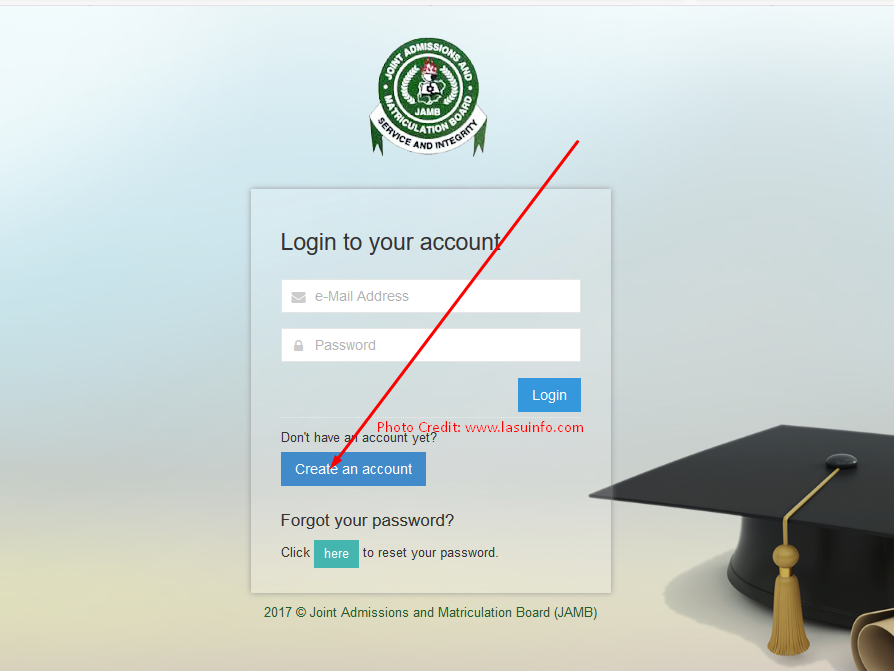
JAMB Profile: Create Account, Profile Code / Password Recovery Guidelines

2. Click on the “Create and Account Button” as shown in the image above.

3. Enter your Email and other required details in the boxes provided [NOTE: You are advised to create an account with a valid email address because all vital information will be sent to the email you supplied ]
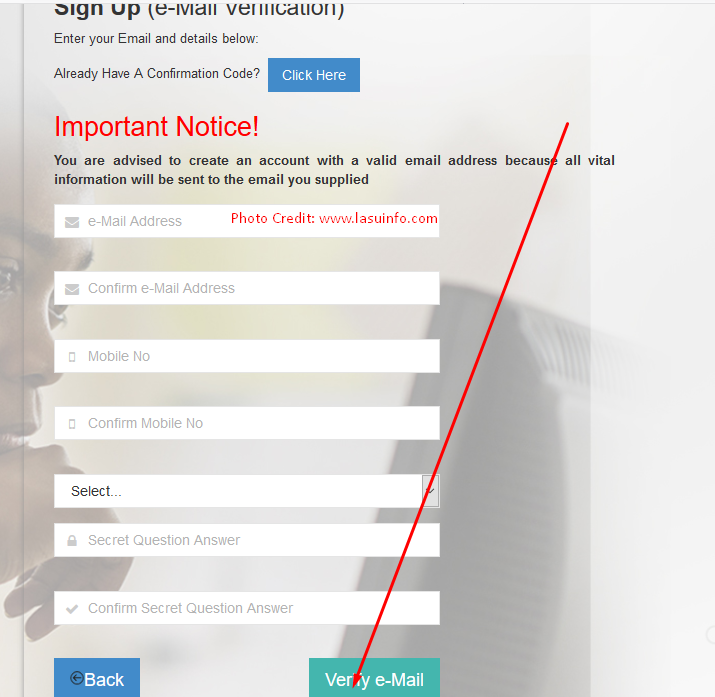
JAMB Profile: Create Account, Profile Code / Password Recovery Guidelines

4. After providing the necessary details kindly click on the “Validate e-Mail” Button as shown in the image above.

5. If all details were correctly imputed, a message box will be displayed asking you to confirm your email address “Your e-mail address has been saved and a confirmation mail has been sent to you (Kindly check your inbox and spam folder). Confirm your e-mail by clicking on the link in the mail to continue your account creation. Your Confirmation Code is also sent to your Provided GSM Number”
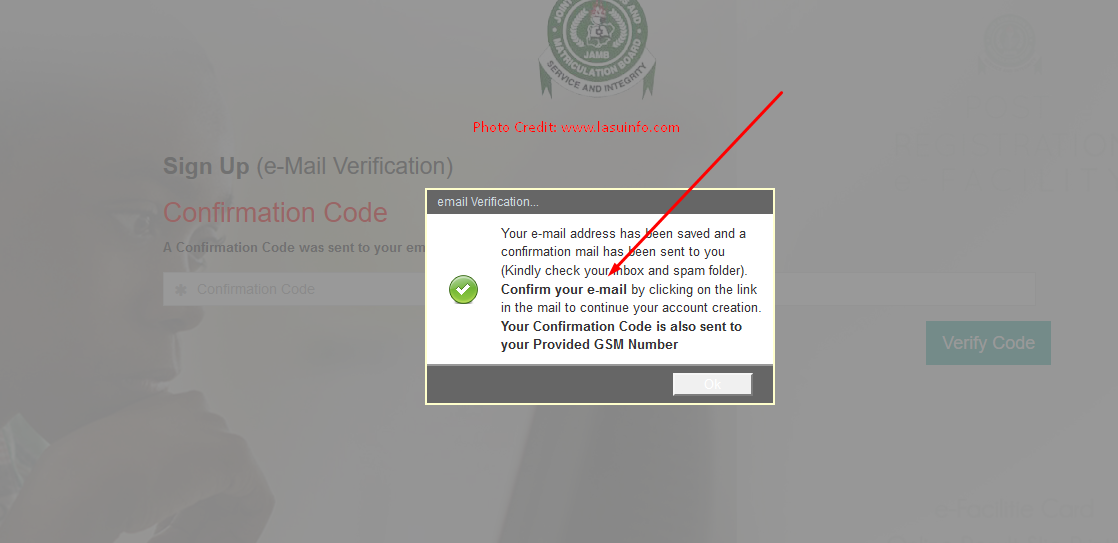
JAMB Profile: Create Account, Profile Code / Password Recovery Guidelines

6. Kindly Check the Email or phone number which you provided, If via email log in and click on the activation link or copy the code and go back to the registration page and input the 10 digit profile code being sent or delivered to you.

7. Kindly provide the code in the box and Click on the “Verify Code Button”

JAMB Profile: Create Account, Profile Code / Password Recovery Guidelines

8. If the code provided is accepted and correct you will now be redirect to the Registration Form Page to fill in all your correct details. [NOTE: Do not make any mistake on this form as any amendment or correction will lead to a service fee of N2,500 on the JAMB Correction of Data Portal.]

JAMB Profile: Create Account, Profile Code / Password Recovery Guidelines

9. After Providing all accurate details, Finally click on the “Sign Up” button to finish the JAMB Profile Account Creation Process.

10. You will be redirected back to the JAMB E-facility page to log in after successful account creation.

NOTE: You can also create an account by visiting any JAMB Accredited Centers or Cybercafes or Using your mobile phones follow the procedures below;

JAMB Profile Account Registration/Account Creation From Your Mobile Phone Device and Number

IMPORTANT UPDATE ON SENDING OF NIN TO 55019
The general public is invited to note that contrary to the earlier release, candidates can send their NIN from any SIM of their choice provided the SIM has not been used by another candidate to register for UTME/DE in the past.
The profile registration is as simple as sending a text to JAMB Short Code 55019 from any of the
Mobile Phone Networks. To register your profile:

I. Candidate will send his/her National Identification Number (NIN) by text (SMS) to 55019 from his/her personal GSM number. E.g. write the word “NIN” then space and add your 11 digit NIN Number and send to 55019 in this format (NIN 00123456789). There should be a space between the word ‘NIN’ and your 11 digit NIN (Note that the number must not have been used by another person to register for UTME/DE in the past).

OR
 
  • Dial *55019*1*NIN# (Your National Identification Number).


ii. A Profile Code of 10 characters is received on your telephone number used in (I) above.

The Cell phone number used for the text message is automatically tied to your name and will be used in all communications related to your Application/Examination.
Surname and First Name are mandatory while Middle Name is optional
iii. Name could be maximum of 38 characters + 2 spaces between names = 40 characters

JAMB Profile Code/Account Recovery Procedures/Guidelines

If you recently forgot or misplaced your password or profile code attached to your JAMB Profile/Account kindly follow the steps to recover it.
STEP 1:
    • Visit the JAMB e-Facility Page via https://jamb.gov.ng/Efacility
    • Locate the “Forget you Password” Space and click on the “Reset Password” link
  • Provide the email and Date of Birth used in account creation
  • Finally click on the Get Password Reset link
The Password Reset link will be forwarded to the email address you used in registering or creating your profile.
STEP 2
Using your Mobile Phone and Registered Phone Number Send [RESEND] to 55019 as text message from the same mobile number.
Your Profile code will be sent to you, You can also use the profile code as a password while logging in.
If you experience any difficulties while following any of the above procedures kindly notify us by using the comment box below.
Previous Post

JAMB 2022 List of Suspended & Delisted CBT Centers Nationwide

Next Post

JAMB CBT Exam Guide | CBT Without Mouse | CBT FAQ | UTME FAQ

Next Post
 JAMB CBT Exam Guide

JAMB CBT Exam Guide | CBT Without Mouse | CBT FAQ | UTME FAQ

Trending Stories

Latest JAMB News

How to Create 2022 JAMB Profile & Get a 10-Digit Profile Code

Caleb University Female Student Leaked Sextape Goes Viral, Sparks Social Media Frenzy (Watch Here)

Balthazar Video Telegram

Balthazar Video Telegram: Watch All 400 Balthazar Engonga Sex Tapes Here

Baltasar Engonga Wife Sex Video

Watch Viral Baltasar Engonga Wife Sex Video With Another Man Here

Balthazar Video Telegram

Direct Link To Watch All Baltasar Engonga 400 Videos With Government Officials Wives

Baltasar Engonga Wife Video Knacking Another Man

Watch Full Baltasar Engonga Wife Video Knacking Another Man [#BaltasarEngonga]

World Bank

World Bank and IMF: Partners in Africa’s Development or Obstacles to Its Future?

African Leadership

While Nigerians Live in Fear, Politicians Fight for Power By Festus Edovia

Ifunanya Lawyer Biography

Ifunanya Lawyer Biography, Photos, Nudes Videos, Age, Instagram, Controversy

Ifunanya Lawyer Leaked Video

Ifunanya Lawyer Leaked Video Goes Viral On Twitter, Reddit, Instagram, Youtube

Latest Stories

Winston Osuchukwu

3 Infrastructure Gaps Nigerian Lenders Can’t Afford to Ignore By Winston Osuchukwu

Winston Osuchukwu

Personal Equity: Quantifying Individual Activity to Price Risk By Winston Osuchukwu

Nathu La Server

Zoho Unveils In-House Nathu La Server to Cut Costs, Boost AI Performance and Advance Digital Sovereignty

IMF

IMF Warns Nigeria Over Rising Bad Loans Despite Stronger Banks from Recapitalisation Drive

Former NNPC Boss Mele Kyari

Senate Orders Arrest of Former NNPC Boss Mele Kyari Over Failure to Appear in N210 Trillion Audit Probe

African Leadership

While Nigerians Live in Fear, Politicians Fight for Power By Festus Edovia

African Leadership

Stolen Wealth, Stolen Future: The Tragedy of African Leadership By Festus Edovia

World Bank

World Bank and IMF: Partners in Africa’s Development or Obstacles to Its Future?

​HabariPay

​HabariPay Launches Maiden “HabariPay Impact Report 2025”, Showcasing Business Evolution, Digital Payments

Osasikemwen Ighile

How a Regular Savings Culture Can Support Long-Term Financial Stability – Osasikemwen Ighile

NewsOnline 2026

Get the Latest Naija News, Breaking News, Top Stories, World News, Business, Politics & Entertainment from NewsOnline Nigeria.

RELEVANT PAGES

  • About Us
  • Advertise
  • Contact Us
  • Privacy Policy

ALERT US

Important Press Releases, Special Investigations: admin@newsonlineng.com

OFFICE ADDRESS

13 Poland Street, London, United Kingdom (UK)

Copyright © 2026 NewsOnline Nigeria

No Result
View All Result
  • Headlines
  • Top Stories
  • Politics
  • Crime Watch
  • Entertainment
  • Sports

Copyright © 2023 Newsonline Nigeria