How to disable private number & enable caller ID on android & iPhone 2022 can be accessed below.
Newsonline has obtained how to disable private number Or enable Caller ID on Airtel, MTN, Glo, and 9mobile On Android and iPhone 2022 for free.
Receiving calls from an unknown number (private Number) can put you in a confused state, hence the need to provide options to disable caller ID or enable ID and also to set as default base on the network providers, and this can also be enabled via USSD code for a particular caller of your choice.
Newsonline Nigeria reports that many Android devices will for sure let you disable caller ID on your line so your number won’t be displayed when you make all outgoing calls.
Newsonline has provided got two options to disable private number for MTN, GLO, Airtel, and 9mobile on your android device, of which we shall be discussing one after the other in this Article.
[the_ad id=”25371″]
Before we get you to know how to disable private number or unknown number, you might actually want to know how to enable or turn on a private number (Caller ID), so let’s get to discuss that first before getting to the business of the day.
How To Turn On or Enable Private Number (Caller ID) Using Private Number Code
You can generally hide caller ID or enable private number specifically on a particular call by simply dialing #31# before the contact number. Eg #31#08130856248.
Enable Caller ID or Turn Off Private Number For A Particular Caller Using private Number Code In 2022
As discussed above, you manually turned off your caller identity for a particular number using private number code #31# and now if you wish to disable the private number manually, all you have to do is simply dial the contact number alone without adding the #31#. So easy right? Read on—
How To Permanently Enable Caller ID or Disable Private Number For MTN, GLO, AIRTEL, or 9mobile On Android 2022
To disable a private number, in other words enabling caller identity on your android device simply follow the steps below.
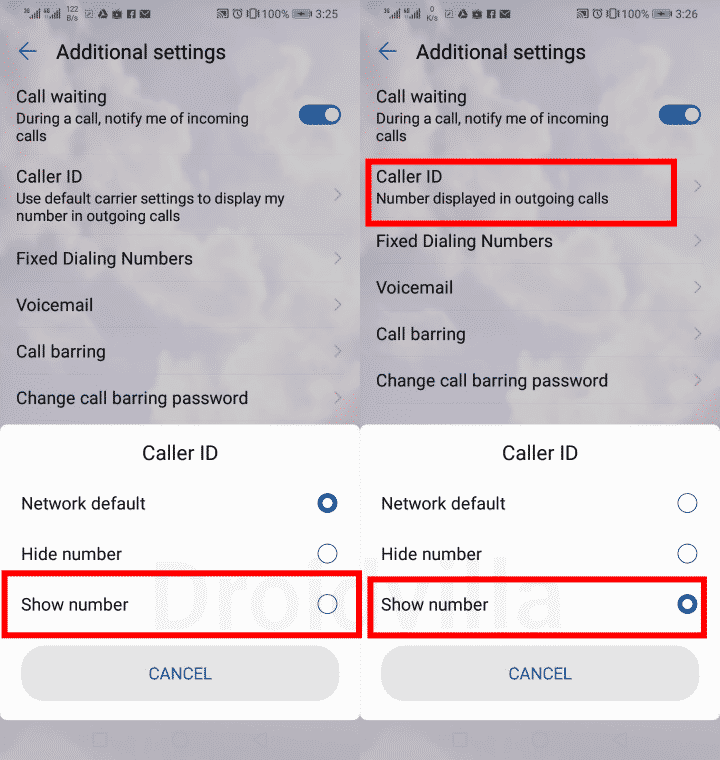
- On your Android device, go to settings
- Locate and select (Wireless and networks)
- Now tap on call settings and you should see your sim options (Sim 1 and Sim 2)
- On the sim section, you wish to disable the private number, tap on “Additional Settings.”
- Finally, Tap on “Caller ID” and select show number. If you wish to enable private number or disable caller identity then you can select on hide number.
[the_ad id=”25371″]
(Automatically it is always set to default, which sometimes becomes a private number and visible). So you decide what you want!
You can as well get these settings directly from your android dialer, by simply tapping on the three-dotted icon on your dialer app and tapping on Settings, navigating to additional settings, and then Caller ID.
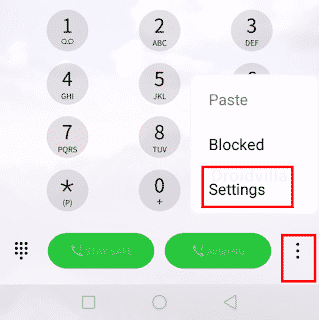 |
| Locate Caller id to disable a private number |
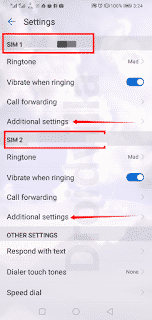 |
| Disable caller id on android |
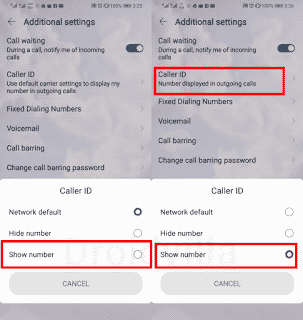 |
| Caller id disable and enable |
How To Permanently Enable Caller ID or Disable Private Number For MTN, GLO, AIRTEL, or 9mobile On iPhone (ios) 2022
For my ios users, to disable or enable private number or caller ID kindly follow the steps below.
[the_ad id=”25371″]
- On your iPhone, open the “Settings” from the home screen
- Tap on “Phone.” select “Show My Caller ID” and use the toggle button to activate or deactivate this feature.
The Major Problem With private numbers enabled is the fact that all outgoing calls might be ignored or rejected in some cases since the receiver might feel unsafe to pick up the private number caller.
Finally, we have come to the end and with this article, you should know how to disable private number Or enable Caller ID on Airtel, MTN, Glo, and 9mobile On Android and iPhone 2022.
Just if your number always shows on the receiver’s end as an unknown number or private, this article is just a fix for you.